EMPLOYEE SELF SERVICE · TIME OFF
Comp off Grant Request
Claim a compensatory off entitlement for hours worked outside normal schedule — after a weekend, public holiday, or extended on-call.
Request
👥 WHO USES THIS
▸ Employees who worked weekends, holidays, or beyond scheduled hours.
▸ Shift workers and on-call engineers claiming earned comp-off.
▸ Field / site staff raising grants against attendance records.
▸ Managers who need to know what their team has claimed.
⚙ Before You Begin
▸Confirm the work date qualifies under company comp-off policy.
▸Have proof / attendance record for the work performed.
▸Check whether grant needs managerial pre-approval.
✨ WHAT YOU'LL ACHIEVE<
▸Submit a grant request citing the worked date.
▸Track manager approval and HR acknowledgement.
▸See balance updated once the request is granted.
Employee Self Service → Time Off → Compensatory Off → Comp off Grant
The Comp Off Grant feature in ESS allows employees to request compensatory leave for working on week offs/rest days or holidays, even when attendance data is not automatically captured. Employees can manually provide details of the work performed, enabling accurate tracking and policy-based approval.
To apply for a comp off grant request, click the three dots in the Actions column and click Add. A pop-up window will open, where employees must fill in all the mandatory fields and submit the request.
Based on the employee’s work schedule, week off policy and applicable holidays, the system automatically displays the list of eligible week off and holiday dates in the Comp off Grant module.
Employees can then select the date on which they worked.
After selecting the worked date, the employee clicks on the Add. A pop-up window opens where the employee must enter Start Date & Time and End Date & Time. The system automatically calculates the total hours worked for the selected date.
If configured in the Comp off Policy, the employee may need to upload supporting documents and provide a reason for working on week off/holiday.
Once all required details are filled, the employee clicks Submit.
The request is forwarded to the Manager/ designated approver as per the workflow.
The Manager/designated approver reviews the request details, validates the justification, and either approves or rejects the request.
Upon approval, the Comp off balance is automatically credited to the employee’s leave account subject to policy rules(eg: minimum hours worked, validity period etc).
To view data: Select the record, and a pop-up window will open displaying the applied grant request.
To edit a request: Click the Three Dots in the Actions column and select Edit.
On this screen
This is the Add Comp Off Grant Request form. Enter the work date, event type (weekend / holiday / extended shift), hours worked, and supporting context. The backdating window is 14 days by default — older claims need HR override.
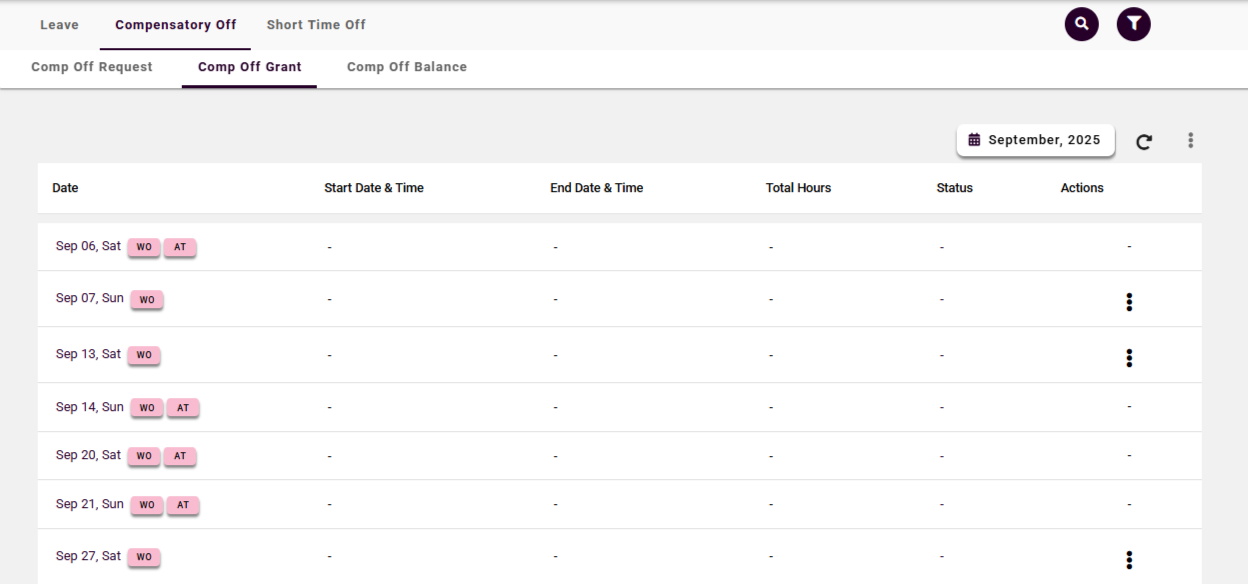
Fig: Comp off Grant
On this screen
Once approved, the grant appears on the Comp Off Grant screen with the work date, converted days, and expiry date (default 60 days from approval). This is the balance you'll consume against when raising a comp-off consumption request.
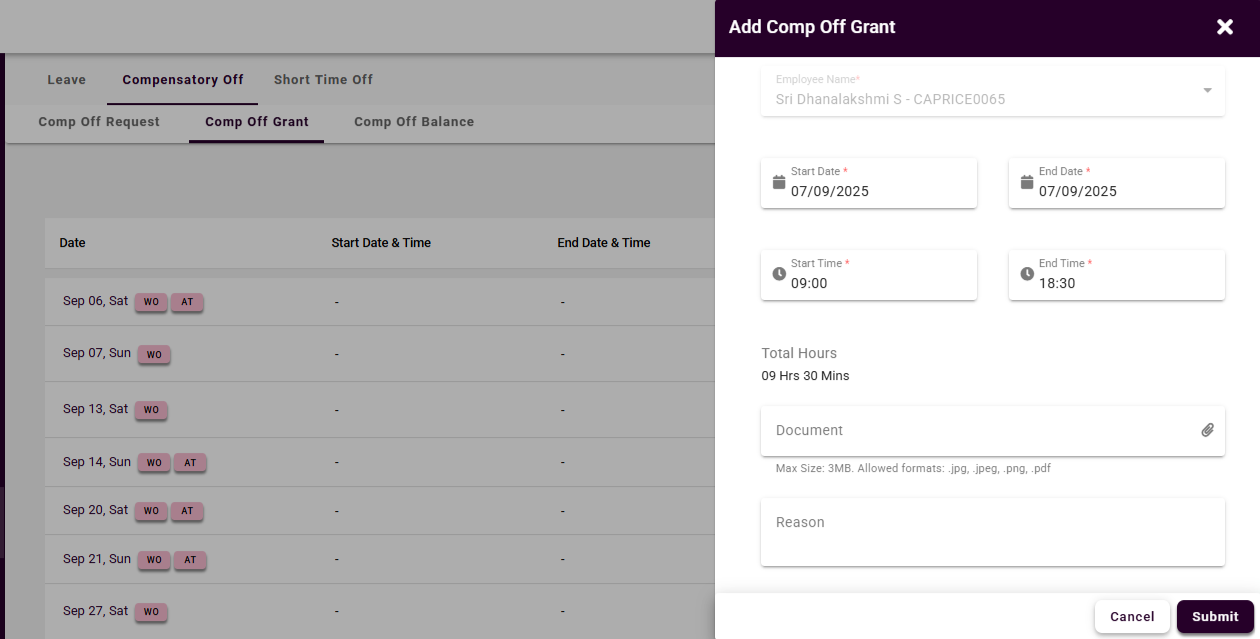
Fig: Add- Comp off Grant Request
Field Reference — Comp Off Grant Request Form
What you'll fill in when claiming comp-off for extra work performed.
| Field | Description | Required | Validation |
|---|
| Work Date | The non-working day / after-hours date when you worked. | Yes | Must be within the backdating window (14 days default). |
| Event Type | Weekend work / Public Holiday work / Extended Shift / On-Call Callout. | Yes | Determines the conversion multiplier applied. |
| Hours Worked | Actual hours you put in on the Work Date. | Yes | Must meet the minimum threshold (4 hours for half-day, 8 hours for full-day). |
| Shift / Project Context | Which shift plan, project, or client the work was for. | Yes | Free-text; used by manager to validate business need. |
| Attendance Reference | Biometric punch ID / timesheet ID — auto-filled if attendance is synced. | Auto | Editable only when auto-detection fails; HR override available. |
| Supporting Evidence | Email, ticket, or approval chain confirming the work was authorised. | Conditional | Required when attendance data is unavailable or remote-work. |
| Reason / Justification | Why the extra work was necessary. | Yes | Minimum 20 characters; max 500. |
| Approver | Auto-populated from reporting manager. | Auto | HR can re-assign for override cases. |
Frequently Asked Questions — Comp Off Grant Request
Q. Do I need to raise a grant request manually?
Not always. If the attendance system detects eligible extra work (weekend/holiday hours above the threshold), it can auto-create a grant request for your manager to approve. Manual requests are for cases where attendance data is missing or incorrect.
Q. How far back can I claim comp-off?
The default backdating window is 14 days from the work date. Beyond that, HR override is required with justification.
Q. What proof do I need?
Attendance records (biometric punch or timesheet) are the primary proof. For field work or remote days, you may need supporting evidence like client emails or ticket IDs — check your policy.
Q. What if my manager rejects the grant?
You'll receive a notification with the reason. You can discuss with your manager and resubmit if additional context is needed, or escalate to HR if you believe the rejection is incorrect.
Q. Does the grant expire immediately on approval?
No — the clock starts on approval. Default validity is 60 days (configurable 30/60/90). You'll receive reminders at T-14, T-7, and T-1 days before expiry.
Related Articles