EMPLOYEE SELF SERVICE · TIME OFF
Leave Balance
Your current leave balances across every leave type — casual, sick, earned, privilege — with carry-forward and pending requests.
Balance
👥 WHO USES THIS
▸Employees planning upcoming time off.
▸Managers cross-checking team availability.
▸HR & payroll reviewing leave obligations.
✨ WHAT YOU'LL ACHIEVE<
▸Opening balance, accrued, consumed, and current balance.
▸Breakdown per leave type.
▸Upcoming approved leaves that will reduce balance.
Employee Self Service → Time Off → Leave → Leave Balance
It provides employees with a comprehensive overview of their leave entitlements and usage. It allows them to easily track and manage their leave details, including the total number of leave days allocated for each leave type in the current leave year, the number of days already utilized, and any leave days carried forward from the previous year, if applicable.
Employees can also monitor leave requests that are pending approval from their manager or admin and view their real-time available leave balance after accounting for both taken and pending leaves.
On this screen
The Leave Balance screen. Each leave type has its own row showing Entitlement, Accrued so far this year, Consumed, Pending approval, and Available (Accrued − Consumed − Pending). Hover any number for the calculation breakdown.
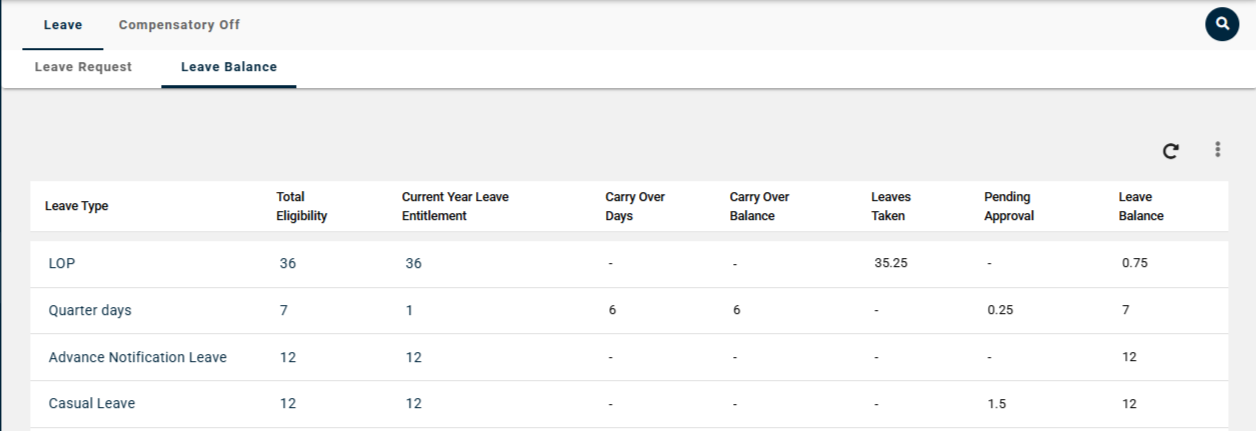
Fig: Leave Balance
Fields Description
Title | Description |
|---|
Leave Type
| The category of leave the employee is applying for (e.g., Annual Leave, Sick Leave, Maternity Leave). |
Total Eligibility
| Formula for Total Eligibility= Current Year Leave Entitlement+ Carry Over Days |
Current Year Leave Entitlement | It refers to the total number of leave days an employee is eligible for during the ongoing calendar, as per the organization’s leave policy. |
Carry over Days | The unused leave days from the last leave year that have been transferred to the current year, as per the organization's carry forward policy. |
Carry Over Balance | Refers to the number of leave days taken by the employee from the carry over days. |
Leave Taken | It refers to the total number of leave days an employee has utilized |
Pending Approvals | It refers to the leave requests submitted by the employee that are awaiting action from the reporting manager or approver. These requests have not yet been approved or rejected. This balance will remain unaffected until the request is approved. The deduction will occur only after the leave is approved. |
Leave Balance | Formula= Total Eligibility- Leaves Taken |
Frequently Asked Questions — Leave Balance
Q. What do the different balance columns mean?
Entitlement = your annual allocation for each leave type. Accrued = earned so far this year (pro-rated monthly for most types). Consumed = already used. Pending = awaiting approval. Available = accrued minus consumed minus pending.
Q. Why is my accrued balance less than my entitlement?
Leave accrues over the year, not upfront. If you're looking at your balance mid-year, accrued = (months worked so far ÷ 12) × entitlement for most types. Some types (e.g. Casual) may be front-loaded.
Q. What happens at year-end?
Carry-forward-eligible types (Annual / Earned Leave) roll over up to a configured cap; the excess lapses. Non-cumulative types (Casual, Sick) reset to zero. The cutover runs at 23:59 on your financial year close date.
Q. Can I see how my balance was calculated?
Yes — the ledger view shows every accrual event (monthly earnings), every consumption event (approved requests), and every adjustment (HR overrides or encashment) with timestamps.
Q. The balance shows a number I don't agree with — what do I do?
Check the ledger first to understand the history. Pending requests often explain the gap. If after reconciling the ledger the balance still looks wrong, raise with HR — overrides are logged and you're notified by email.
Related Articles